Transfotech Team
 Imagine opening your laptop on Monday morning and finding that you cannot access your business email. Your employees cannot open customer files. Then a supplier calls about a payment you never approved.
Suddenly, your team has to stop its regular work and figure out what happened.
Cyber attacks can affect any business that uses online accounts, handles payments, or stores information. You do not need a large company or a famous brand to have something worth protecting.
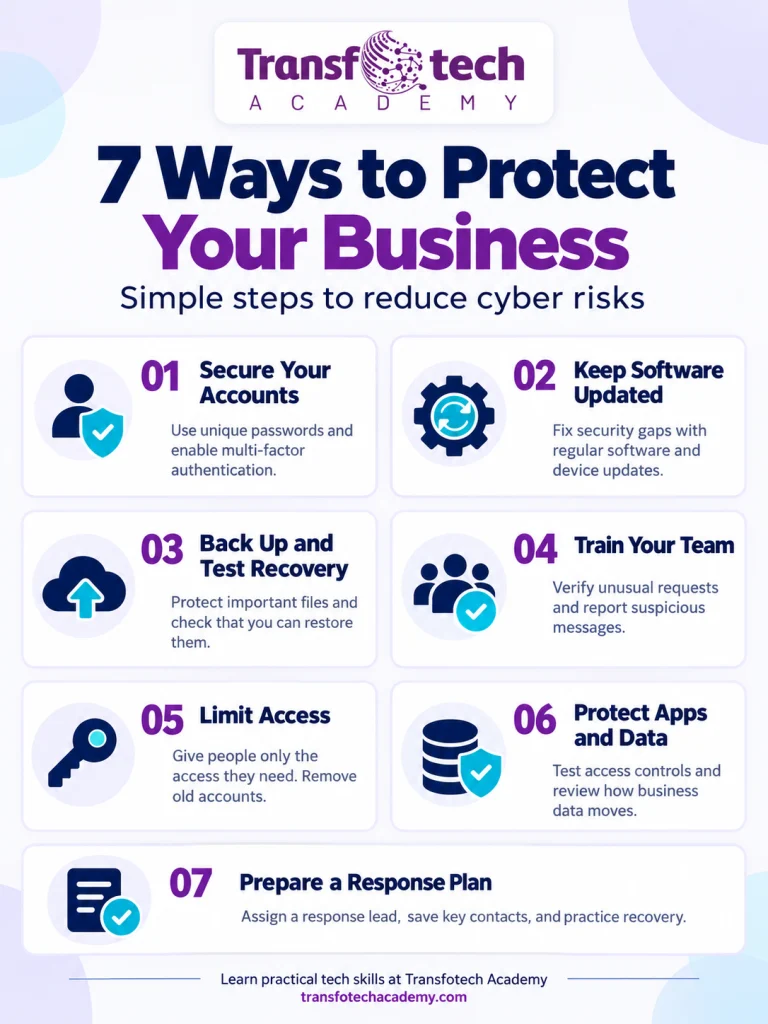
Fortunately, you can reduce your risk through practical steps. Secure important accounts, update your systems, test your backups, and teach employees how to handle suspicious requests.
You also need people who understand how your technology works. That is where practical learning becomes valuable. Throughout this guide, we will explore business security measures and relevant Transfotech Academy online courses that help learners develop cybersecurity, DevSecOps, and data engineering skills.
Why Business Cybersecurity Deserves Your Attention
Your business probably depends on email, accounting tools, customer records, payment systems, and shared files.
If someone steals an account or blocks access to those systems, your team may struggle to serve customers, process orders, or pay suppliers.
Recent research shows why basic maintenance matters. Verizon’s 2026 Data Breach Investigations Report found that 31% of breaches started with software vulnerabilities. The report covers incidents from November 2024 through October 2025.
Meanwhile, IBM’s 2026 report puts the global average cost of a data breach at $4.99 million. That figure reflects its research sample, rather than the likely cost for any individual small business.
For your own business, start with a simpler question: How long could we operate without our most important systems?
Your answer will help you decide what to protect first.
1. Identify Your Most Important Systems
Before buying another security tool, list the systems that keep your business running.
Include business email, banking, payroll, customer databases, shared storage, your website, and any software employees use every day.
Next, assign an owner to each system. That person should know who has access, who maintains it, and how your team would recover it.
Focus on business impact
A retailer might prioritize payments and online orders. A training company might focus on student records and its learning platform. An accounting firm might start with client documents and email.
Ask three questions:
- What happens if we lose access?
- What information could someone steal or change?
- Who would help us recover?
Start with your three most important systems. You can expand the review as you work.
The NIST Small Business Quick-Start Guide offers a useful planning resource for organizations with limited cybersecurity experience.
2. Secure Your Business Email and Accounts
Your email account often connects to the rest of your business. Employees use email to reset passwords, approve requests, and exchange sensitive documents.
Enable multifactor authentication, or MFA, on important accounts. MFA adds another check when someone signs in.
Prioritize email, banking, payroll, remote access, and administrator accounts. Where services support them, consider phishing-resistant options such as passkeys or security keys. CISA recommends phishing-resistant MFA where available.
Use individual accounts
Give employees their own logins whenever possible. Shared accounts make it harder to manage permissions and understand who changed something.
Use an approved password manager to help your team create and store unique passwords. Also, protect recovery methods and document what employees should do if they lose a device.
Start today: Check the security settings for your main business email account. Confirm that you have enabled MFA and secured its recovery options.
3. Update Software and Remove Unused Tools
Software updates often fix weaknesses that attackers could exploit. However, businesses can miss updates when nobody clearly owns the task.
Assign someone to review computers, phones, browsers, website plugins, routers, and other important systems.
If an outside provider manages your technology, ask:
- Which updates do you handle?
- How do you identify devices that missed updates?
- Which systems no longer receive security fixes?
- How do you test updates for critical applications?
Remove applications and services your business no longer uses. Plan replacements for unsupported systems.
For important business software, agree on a safe update process and a rollback plan if something fails.
Start today: Create a list of overdue updates and assign each item to a specific person.
4. Back Up Your Data and Test Recovery
A backup helps only when you can restore the information you need.
Decide which files and systems your business must recover first. Then work out how often to back them up and how long you could operate without them.
CISA’s StopRansomware Guide recommends frequent backups and discusses offline and cloud-to-cloud approaches.
Run a practical recovery test
Choose a sample folder or dataset and restore it into a safe, separate location.
Check whether the files open, whether the information is complete, and how long recovery takes. Record the steps so another employee can repeat them.
Also, ask your provider how they protect backups if someone compromises your normal administrator account.
Do not assume that file synchronization and backup services offer the same protection. Review your service’s recovery and retention features.
Start today: Schedule one small restoration test and document the result.
5. Help Employees Handle Suspicious Requests
Employees make security decisions every day. They open attachments, approve payments, share documents, and respond to support requests.
Use examples that match their work.
For instance, a supplier might appear to request a change to bank details. The email could use a familiar name and sound convincing.
Your finance team still needs to verify the request.
Create a payment-verification rule
Before changing payment details, contact the supplier through a phone number your company already trusts.
Do not rely on a new number inside the suspicious message.
Apply similar checks to unusual requests for passwords, sensitive documents, or remote access.
Make reporting easy, too. Tell employees where to report suspicious messages and accidental clicks. Encourage quick reporting so your team can act.
Build deeper cybersecurity skills
General awareness helps employees make safer decisions. People who manage technical security also need practical training.
Transfotech Academy’s AI-Powered Cybersecurity Engineering online course combines live instruction with practical labs. Its curriculum covers security foundations, risk assessment, vulnerability testing, system hardening, cloud security, and AI security testing.
Learners work with tools such as Kali Linux, Burp Suite, Nmap, and Wireshark in training environments. This makes the program relevant for people who want to understand security weaknesses and practice assessing them.
Explore the course: AI-Powered Cybersecurity Engineering at Transfotech Academy
6. Control Access to Business Information
Not everyone needs access to every file or system.
Employees often collect permissions as they change roles. Contractors may also retain access after finishing their work.
Review your customer database, payroll tools, shared folders, and administrator accounts.
Ask managers to confirm who still needs access and what each person should be able to do.
For example, a sales employee might need to update customer records without needing permission to change security settings.
Also, review old sharing links and former employee accounts. Assign someone to remove access when people leave.
Start today: Compare one important system’s user list with your current employees and contractors.
7. Understand Where Your Business Data Goes
Your business may move information between forms, databases, payment tools, reports, and cloud services.
Each connection deserves attention.
Map where important data starts, where it moves, and who can access it. Identify unnecessary copies and document who maintains each connection.
For example, if your website sends customer information to a database and then to a reporting tool, your team should understand all three systems.
Develop practical data engineering skills
Transfotech Academy’s Data Engineering Program focuses on building and managing data workflows.
The curriculum covers SQL, Python, data modeling, cloud data, PySpark, Airflow, dbt, Docker, and data quality. Learners complete practical work involving databases, automated pipelines, testing, and documentation.
These skills support a clearer understanding of how business data moves and how teams maintain reliable systems. Data engineering complements security work by helping teams understand the systems and processes that handle their information.
Explore the course: Data Engineering Program at Transfotech Academy
8. Build Security into Software Development
If your business creates applications or websites, include security checks throughout development.
Start by asking what each feature does, what information it handles, and which users should have access.
Then test those rules.
For example, a customer should only see their own invoices. Changing a request should never reveal another customer’s records.
OWASP identifies failures in this type of access control as a major API security risk.
Also, assign responsibility for reviewing software dependencies, cloud permissions, exposed passwords or keys, and security findings.
Learn to connect development, security, and operations
Transfotech Academy’s DEVSECOPS MASTERY · 16-WEEK LIVE PROGRAM teaches learners to build, secure, deploy, and monitor an application through a connected workflow.
The program covers cloud infrastructure, automated software delivery, containers, Kubernetes, application security, monitoring, and incident response. Students work on a payments API project and practice different engineering responsibilities through labs and simulations.
This program offers a relevant learning path for people who want to understand how security decisions affect software development and release processes.
Explore the course: DEVSECOPS MASTERY · 16-WEEK LIVE PROGRAM at Transfotech Academy
9. Set Clear Rules for AI Tools
Before employees connect AI tools to company systems, decide what information those tools may access.
Create a list of approved tools. Explain whether employees may upload customer records, financial details, internal documents, or source code.
Review permissions carefully when an AI tool can take actions. Reading a document and changing a financial record carry different risks.
IBM’s current guidance emphasizes limited access, accountability, and monitoring for AI agents.
For example, you could require human approval before an AI tool sends external messages, changes payment details, or deletes files.
Start today: Ask employees which AI tools they use and what business accounts they have connected.
10. Prepare for a Security Incident
A short, clear response plan helps your team act under pressure.
Include the person who leads the response, your IT provider, a backup contact, and the people who can approve major decisions.
Also, identify an alternative communication method and the systems you need to recover first.
Keep a copy somewhere you can access without company email.
If employees notice suspicious activity, ask them to report it promptly and follow the plan. For suspected ransomware, CISA recommends coordinated isolation and communication outside potentially compromised systems.
Avoid rushing to delete files or reset devices without guidance. Those actions could remove information your response team needs.
Start today: Practice a scenario where your team loses email access. Record the questions nobody can answer yet.
Choose the Right Transfotech Academy Online Course
Different technical roles require different skills. Choose a course based on the work you want to learn.
| Your learning goal | Relevant online course | Main focus |
|---|---|---|
| Understand threats and practice security testing | AI-Powered Cybersecurity Engineering | Security foundations, vulnerability assessment, system hardening, and AI security |
| Add security to software development and delivery | DEVSECOPS MASTERY · 16-WEEK LIVE PROGRAM | Cloud infrastructure, delivery pipelines, application security, and incident simulations |
| Build and maintain business data systems | Data Engineering Program | SQL, Python, cloud data, pipelines, testing, and documentation |
Review the curriculum, entry requirements, and live class schedule before choosing your program. Start with the skills most relevant to your current responsibilities or career goals.
Frequently Asked Questions
What should a small business do first to improve cybersecurity?
Identify your most important systems. Then review their account protection, software updates, access permissions, and recovery options. Address urgent problems as soon as you find them.
Can a business improve security without a large budget?
Yes. Start with the protections your existing services include. Review account settings, remove unnecessary access, update supported software, and establish clear reporting procedures.
Can online training help employees build technical skills?
Online training can provide structured lessons, guided practice, and instructor support. Look for a curriculum that matches the learner’s responsibilities and includes practical work they can review and repeat.
Which Transfotech Academy course should I explore for cybersecurity?
Explore AI-Powered Cybersecurity Engineering for security foundations and practical testing. If your focus involves securing software delivery and cloud workflows, review DevSecOps Mastery.
How does data engineering relate to business protection?
Data engineering helps teams understand how information moves between systems and how to maintain reliable workflows. Access controls, monitoring, and recovery planning must support those systems as part of the wider security program.
Can these steps prevent every cyber attack?
No. They help reduce risk and improve your ability to respond. Combine preventive controls with a recovery plan your team has practiced.